Project insights
My Role
Visual design
UX research
The Team
3 Designers
1 Design manager, UX Lead, myself
Results
A New Kind of Personal Shopping
The Collective is a curated luxury lifestyle destination serving discerning customers who demand both quality and convenience. Their clientele - C-suite executives, global travellers, style-conscious professionals who have little time to browse, but high expectations for curation.
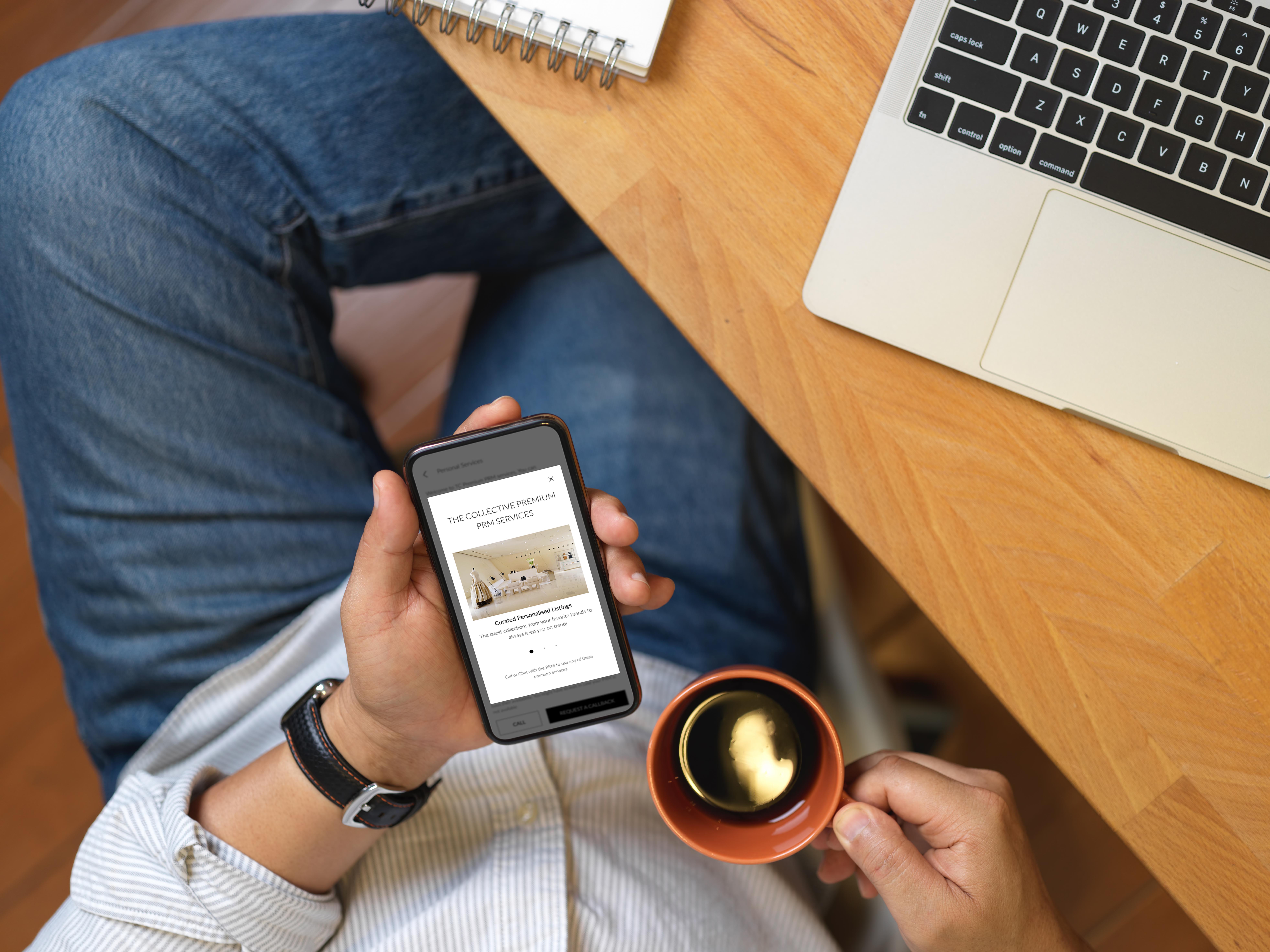
The Co-Browsing Consultation feature bridges the gap between the tactile, relationship-driven experience of an in-store appointment and the speed of digital commerce. A Personal Relationship Manager (PRM) - think personal stylist meets concierge - can now guide clients through a curated shopping session in real time, from anywhere in the world.
72%
of luxury buyers prefer
personalised guidance
11min
average session length
during co-browsing
3×
higher avg. basket value
with stylist assistance
PRM
Personal Relationship
Manager model
68%
of HNW customers shop
via mobile exclusively
0
friction steps to start
from notification
Luxury Service, Lost in Translation
Traditional luxury retail is built on relationships. But as even the most affluent customers migrated to digital, that personal touch evaporated. The Collective identified a critical tension at the heart of their digital offering.
01
The Time-Poor Customer
High-net-worth customers don't browse — they decide. They expect their PRM to know their taste, curate for their lifestyle, and present only what's relevant. Endless scrolling is not for them. They need concierge-grade curation delivered in under 15 minutes.
02
The PRM Disconnected
PRMs had deep knowledge of their clients but no shared digital canvas. Recommendations were sent via WhatsApp screenshots and voice notes — fragmented, off-brand, and impossible to act on with one tap. The relationship was strong; the tooling was not.
03
The Drop-off at Checkout
Even when customers were engaged, converting online was hard. Without the stylist's reassurance — "this works with what you have, trust me" — digital carts were abandoned. The emotional close of a boutique sale was missing entirely.
Two Sides of the Same Conversation
With budget constraints ruling out traditional interviews, we leaned on WordFlow’s internal data to craft three fictional personas:
SR
Sanya Rao
The Collective Customer · Premium Tier
"I trust my stylist completely. I just need her to send me the right three things — not forty — and I need to be able to buy in one tap."
Corporate director, 38. Travels 3 weeks a month. Has a standing monthly consultation with her PRM. Values curation over selection, speed over browsing, and relationship over transaction.
RK
Rakesh Kaushal
Personal Relationship Manager · PRM
"I know exactly what she needs before she asks. I just need the right platform to show her — without sending blurry WhatsApp screenshots."
Luxury stylist, 5 years at The Collective. Manages 40 high-value clients. Maintains curated PRM Lists — seasonal edits, event dressing, recurring preferences. Needs a tool that reflects his expertise.
The entire consultation journey is designed to feel frictionless for the customer and empowering for the PRM. Every step has been choreographed to minimise cognitive load and maximise confidence at the moment of purchase.
The Screens, Explained
Luxury UX is defined not by what you add, but by what you remove. Each decision below was made to serve the high-expectation, low-patience customer — while preserving the PRM's authority as a trusted curator.
| Scenario | Test Case / Task | Observed Issues | Expected UX Outcome |
|---|---|---|---|
| Add User | Add a translator with view-only access to Spanish project | Wrong menu clicks, multi-step workflow | In-context user management via overlay drawer |
| Quick Translate | Translate “emergency exit” to Japanese | Difficulty finding Quick Translate button | Prominent Quick Translate landing page with auto-language detection |
| Edit Document | Fix translation of “safety protocol” in a German manual | Hidden edit options, inconsistent terms | In-line editing with real-time glossary suggestions |
| Upload & Translate | Upload a PDF and estimate translation cost | Confusing translation methods, hidden cost calculator | Real-time cost preview, unambiguous translation methods |
| Share Document | Share a translated contract with Anand | No right-click share menu, manual link copying | One-click share button with OS-native dialogs |
We plotted key workflows for each persona, revealing critical pain points
and improvement opportunities:
🔔
Contextual Notification Trigger
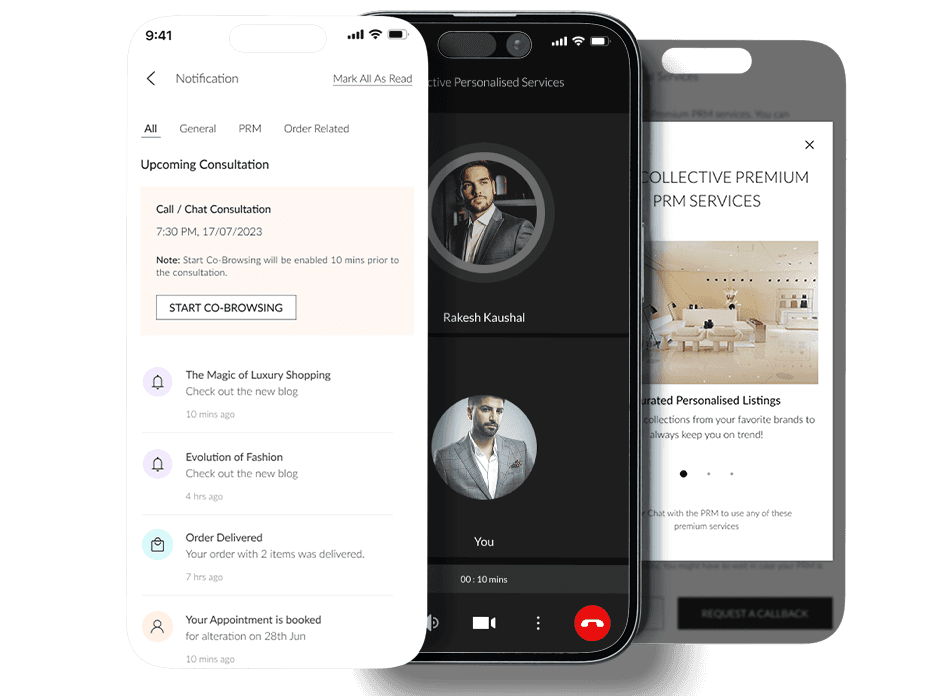
The "Start Co-Browsing" button appears only within the notification card — not buried in a settings menu. It activates 10 minutes before the session, matching the customer's mental model of "almost time." This timing respects their schedule without requiring them to remember or navigate.
📋
PRM Pre-Curated Lists
Rather than asking customers to browse during a call, the PRM arrives prepared. Lists are dated (e.g., "PRM List - Jun 5") and categorised by theme. This mirrors how a personal stylist brings a rail of pre-selected garments to a fitting — intentional, not overwhelming. The customer's role is to choose, not explore.
🎯
Persistent Consultation Bar
A thin, anchored bar at the bottom of every co-browsing screen shows "Ongoing Co-Browsing Consultation" with mic, camera, and timer. This serves two purposes: it reassures the customer the call is still live as they navigate, and it gives the PRM immediate call controls without leaving the shopping context.
🤝
"Take Control" Affordance
The "Add to User's Bag" button is the most important moment in the entire flow. All trust, curation, and conversation collapses into a single action. Getting that button right — its weight, placement, wording — was weeks of iteration on its own.
🛍️
Bulk "Add to User's Bag" Action
The single black CTA at the bottom adds all curated items to the customer's bag in one tap. This eliminates the fragmented experience of individually adding products. It also carries symbolic weight: the PRM's curation becomes the order — a direct transposition of the boutique "I'll take it" moment into digital.
🔑
Restraint is a Luxury Skill
Instead of video thumbnails (bandwidth-heavy, potentially awkward), the in-call screen uses large monogram avatars. This is both a practical performance choice and an aesthetic one — monograms are a luxury signifier. The active speaker gets a border highlight, allowing the customer to always know who is "present" in the conversation.
Designing for Measurable Outcomes
The co-browsing feature was designed with specific business and experience outcomes in mind. By digitising the personal shopping appointment — without stripping its humanity — The Collective could unlock both scale and deeper customer loyalty.
↑3×
Expected basket size
vs. unassisted browse
↓60%
Cart abandonment
with PRM-assisted sessions
↑NPS
Premium customer
satisfaction scores
10×
PRM capacity vs.
in-store appointments
What Luxury UX Taught Us
Designing for high-net-worth, time-poor customers is a fundamentally different discipline. The lessons from this project apply beyond luxury retail.
01
Curation Over Choice
Luxury customers do not want more options — they want fewer, better ones. The PRM List model enforces curation as a feature, not a limitation. Every screen we added that increased options made testing worse; every screen we removed made it better.
02
Technology Serves the Relationship
The consultation bar and "Take Control" feature ensured that even when the UI was simple, the relationship layer was always visible. Technology should enhance human connection, not replace it — especially in luxury.
03
Timing is a Design Element
The 10-minute notification window is as much a design decision as any visual element. Meeting customers at their exact moment of readiness — not too early (forgotten), not too late (rushed) — is UX in the truest sense of the phrase.
04
The Handoff is the Product
The "Add to User's Bag" button is the most important moment in the entire flow. All trust, curation, and conversation collapses into a single action. Getting that button right — its weight, placement, wording — was weeks of iteration on its own.
05
Dual-User Flows Need Parity
The PRM and customer are in the same session but have different needs and permissions. Designing for both simultaneously — without confusing either — required constant role-switching in testing and extremely disciplined state management in design.
06
Restraint is a Luxury Skill
Every feature request that didn't serve the 10-minute session was cut. Ratings, reviews, size guides — all deferred. Luxury is about confidence, not reassurance. A customer who trusts her PRM doesn't need 47 user reviews to add a coat to her bag.


This content is protected.
To view, please enter password.